
Custom Code vs. Page Builders: When Each Makes Sense
Deciding between custom code and page builders? Discover the pros and cons of each to find the best fit for your website needs and budget.
Answer: It Depends (But Let Me Make That Useful)
Well, there’s your answer. Clean, simple. It depends on what you are looking for. You can stop reading here.
In all seriousness, I build custom websites and apps for a living. So, most people would expect me to tell you that page builders are a waste of time, money, energy, and everyone should hire a developer.
I am not going to do that.
Here's the truth: sometimes Squarespace (or any website drag-and-drop builder) is the right call. Sometimes a WordPress template gets you 94% of what you need in a few hours (and sometimes a few tears—but that’s just the nature of dealing with computers, not something unique to page builders). Sometimes the right answer is the one that ships fastest for the lowest cost.
And sometimes those quick builds turn into a nightmare when you realize you need a feature the website or plugins don't support, your subscription fees jump to a rate you don't feel comfortable with, or you don't actually own the underlying code.
The question and answer to "Should I go with a prebuilt website or custom code?" is probably one of the most annoying answers in the tech industry: it depends.
But that answer isn't helpful or satisfying. So, this is my attempt to make that answer genuinely useful, from as neutral a perspective as possible. I will break down options when each make sense, what the tradeoffs actually are, and how to figure out what fits your situation.
No gatekeeping here. No "you need a 10k custom coded website for your underwater basket weaving landing page." Just an honest take from someone who has used both options.
This article is for founders, freelancers, and small businesses deciding how to build—not for engineers optimizing for fun.
It depends on your needs; both options have pros and cons. →
Page builders allow quick, no-code website creation. →
Custom code gives full ownership and flexibility. →
WordPress powers 43% of all websites. →
Use a page builder for fast launches and tight budgets. →
Page builders suit simple needs like landing pages. →
Manage your own content easily with page builders. →
Validate ideas quickly with a page builder before investing more. →
Consider hidden costs of both page builders and custom code. →
Defining the Playing Field
Before we dive headfirst into comparisons, let's get on the same page about what we're actually comparing.
Page Builders
These platforms let you build a website with drag-and-drop tools (no code necessary, though many allow custom code).
Here are some examples:
Wix/Squarespace - The "build it yourself overnight" option. Sleek and professional templates, limited flexibility.
WordPress + Elementor/Divi - More powerful, but now you are having to manage plugins, hosting, and updates.
Webflow - The middle child of the previous two. More control, but can get complex if you let it.
Shopify - If you are selling products, this could be perfect for you and is often the default. Solid until you need something that it wasn't designed for (i.e., something other than selling products).
All of these are legitimate products and services. They can do what you need, but you should scope out the limitations before paying for a $300/year contract.
I’ll use these terms interchangeably throughout this article: page builder, drag-and-drop builder, and site builder. Just know that these all refer to tools like Webflow, Wix, Squarespace, and similar platforms.
Custom Code
This means someone (potentially you, if you're technical) writes real code that runs your site or app. The tech varies with lots of options: React, Node, Python, HTML + CSS + JavaScript, whatever. The point is that this is meant to be built specifically for your use case and needs; you own it, and it isn't locked inside someone else's platform.
There are positives and negatives to this. Server costs jump? Move. Database is too slow? Move. Want to completely change the layout so your dog is the mascot on the home page... do it, but I am not sure what a dog has to do with underwater basket weaving.
The Spectrum
Here’s where it can get blurry for users and even developers. Web builders can be pushed pretty far. Some "custom" sites are just heavily modified templates. The line between custom and prebuilt isn't always clear.
For this post, the question we are trying to answer is this: are you renting a platform's constraints, or are you building something you fully control?
Or perhaps more simply: does renting make sense (with the potential to buy later), or does owning the code first make more sense?
In some ways this can be understood from a housing perspective. You can rent a space and it will function for what it can, but the day you decide that a wall is in the way of efficient living you can't just knock it down. When you own a space you can knock down walls (tear the whole thing to the ground if you wanted).
WordPress powers 43% of all websites and 60.2% of CMS-based sites (W3Techs, December 2025)
Wix: 3.3% of all websites, 258M registered users
Squarespace: ~2.3% of all websites, 4.9-5.2M subscriptions
Webflow: ~0.9% of all websites — fastest growing with 66% revenue growth in 2024
QuoteIn the future writing actual code will be like using a pro DSLR camera, and no code will be like using a smartphone camera.
When a Page Builder Is the Right Call
Let me be clear: page builders are not a compromise. For a lot of projects, they are the best tool for the job.
This next paragraph is a bit of a call-out. So, if you are a programmer and don't feel like being called out, then skip it. If you disagree, send me an email! Let's chat.
I think that there is a stigma (at least in the programming community) about using a drag-and-drop builder, and that stigma is wrong. There are real use cases, and the problem isn't "well the coding community is being destroyed by these quick, lazy solutions," the problem is "what does an end user need and for what price."
On User NeedsUser needs trump a programmer's "feeling" about the industry. If a user needs something, either provide it yourself for a competing cost, or find a solution that is more compelling to the user.
You need to launch fast
If your timeline is "we need something up and running in a week," a page builder wins every time. A custom build with complex requirements can take weeks (if not longer). A Squarespace site can be live tonight.
QuoteLaunch fast. The reason to launch fast is not so much that it's critical to get your product to market early, but that you haven't really started working on it until you've launched.
Your budget is tight and your needs are simple
A small business needs a landing page, an about us, a contact page, and maybe a blog (this is not a command but my assessment of it). That is not a $5,000 endeavor. That's $200/year website builder subscription with a custom domain and a weekend of time.
Small businesses need to start somewhere, and starting small and scaling up is the right call. If you later decide you need something a little more complex you can move up to adding more complexity to your drag-and-drop site, or you can decide to hire a programmer or a team.
The nice thing about these page-builders is that the cost is fixed (unless your contract is increased at the end of its term). It is predictable.
I will talk about this more in the custom code section but depending on what your needs are you might be facing variable costs depending on things like database calls, server upspinning, and AWS usage.
You want to manage it yourself
If you want to update your own content, swap out images, or add a new page without emailing or texting a developer every single time, page builders are designed for this purpose.
You're validating an idea before investing more
Building a full custom product before you know if it is worth it, feasible, or market ready is a founder's classic mistake. A page builder lets you get something in front of people fast. It shows off your idea without throwing money into a hole that might not spit it back out.
QuoteFind a judo solution, one that delivers maximum efficiency with minimum effort. When good enough gets the job done, go for it.
In 2018, only 64% of small businesses had websites. Today it's 83%. Page builders made that possible. Cost as a barrier dropped from 26% to just 16% over that time
When Custom Code Is Worth It
Okay, my turn now. I am not going to lie; this is where my bias will show the most. I love programming, and programming solutions that actually work. I love to get feedback on my work that says "this is EXACTLY what I needed." That is where custom code can make sense.
Custom code isn't about showing off or peacocking around. It's about building something that does exactly what you need it to do. Nothing more, nothing less. And it is something that you actually own.
You might be thinking, well I don't need custom code for a portfolio site (cough cough tylergordon.dev). Here is the thing though, I get to control the entire site. The code, the look and feel, the way you click a button and the responsiveness to that button. Often times custom coded websites are able to do things before page builder sites.
One example is AI integration. Some page builder sites are integrating AI into their sites (some are still missing it). Using those AI services often times cost a flat fee (and sometimes have overage fees) and you are forced to use whatever model they use. You don't get a say in the matter. With a custom coded site like this one I get to choose which AI model I use, even the level of model I use. gpt-5.2 costing too much money? Downgrade to 4o. Don't like the responses from OpenAI? Switch to Claude.
Okay, enough about me. Let's get into the reasons when custom code is worth it.
Your project has real functionality
User accounts, Payments, Dashboards, integrations with other systems, custom workflows, logic that goes beyond "display content." That all falls into a category where custom code will make sense. You might be able to get pieces of that functionality from the page-builder sites, but it will be limited and sometimes confusing to set up.
If you need your site to do something and not just show something you're pushing against what page-builders were built for.
Performance and scale matter
Page builders are generated by code (yes, they run on real code so in a way it is "custom code" but not in the way I am talking about). This code can be bloated, filled with unneeded calls, and sometimes slow to respond. That's not a jab, it's a tradeoff they make to stay flexible with multiple use cases and beginner-friendly.
But if your site needs to load fast, handle traffic spikes, or rank well on Google, that bloat can cost you. With custom code (and servers you "own") you can easily manage traffic spikes, load times, and Google page mapping.
Mobile users are impatient with slow sites: Google research found that 53% of mobile visitors leave a page if it takes more than 3 seconds to loadand that bounce probability jumps 123% when load time increases from 1 second to 10 secondsFaster speed also drives results—Portent’s research found conversion rates are about 3× higher at 1 second vs. 5 seconds
You don't want to be locked in
When you are building a site with a site builder you don't 'own' the site in the traditional sense. You are renting the space, code, and platform. If they raise prices, change features, or shut down-you're stuck.
the core majestic monolith is still gleaming in the sunshine. In fact, the architectural harness has not only carried us incredibly far, but when I examine the codebase today, I smile. This is still good. Very good. It's not full of cruft, not a graveyard of bad decisions, not a stacked ledger of technical debt.
In the age of platform dependency, one strategic misstep can lock your business into a closed system and potentially jeopardize its future.
The Hidden Costs Nobody Talks about
Welcome to modern day capitalism. Every option has a sticker price. Every option will have a hidden gremlin that will pop up and say, "oh yeah, you want that feature? $20." Those aren't imaginary they are real and guess what--they suck.
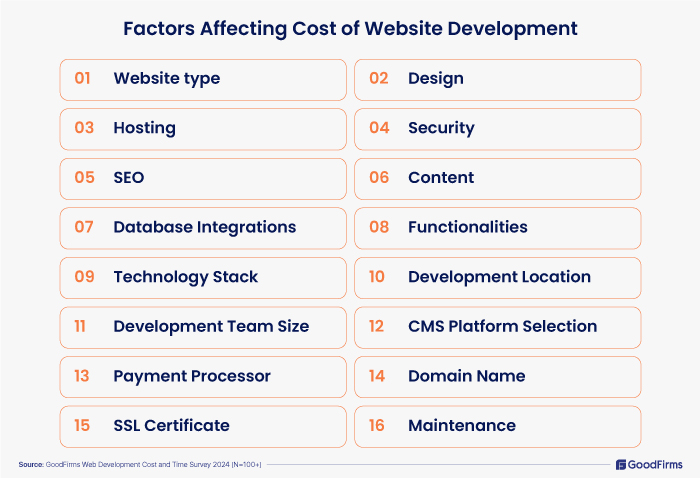
Now, you don't need everything listed above. For example, you might not need a payment processor, or domain name. These are just ideas for different things that might go into building a custom website.
The Hidden Costs of Page Builders
Subscription fees... forever. Squarespace monthly pricing is from $25 to $56 a month[1]. Wix is $17 to $39 a month[2]. That doesn't sound like much but the math adds fast.
Let's just say you take the middle option for both of the sites listed above, let's break down the math for five years:
Squarespace: $36/mo x (12 x 5) = $2,160
Wix: $29/mo x (12 x 5) = $1,740
All of this math is just taking into account base pricing. That doesn't include premium themes (ranging from $100 to $500), apps/plugins (which has a wide range of prices $5 to upwards of $40 a month), and transaction fees (0% to 2%).
Plugin roulette. Need a feature that the platform doesn't support? Well I have good news and bad news. Good news: You can probably find it in a plugin that is provided. Bad news: you are now dependent on another third-party developer to:
Keep it updated
Keep it secure
Manage the price
Patchstack State of WordPress Security 2025 Report found:
7,966 new vulnerabilities discovered in 2024—a 34% increase over 2023
That's ~22 new vulnerabilities per day
96% of vulnerabilities were in plugins, not WordPress core
33% were never patched before public disclosure
Migration pain. You've outgrown your Wix site, or maybe your site builder site has increased costs above what you are comfortable with. Either way, now what? You can't export your site and move it somewhere else. You are rebuilding from scratch.
Site builder migrations require rebuild: Switching between proprietary website builders (e.g., Wix and Squarespace) is not seamless – there’s no direct migration tool, so content must be manually transferred and the site essentially rebuilt on the new platform.
Small site (5-page) migration: Hiring a U.S.-based web professional to migrate a small website (around 5 pages) typically costs on the order of $1,500–$2,000. This covers basic content transfer and setup on the new platform.
Complex migration with SEO: For larger or more complex migrations – especially those preserving SEO (setting up 301 redirects, maintaining rankings) and carrying over custom features – costs often fall in the $5,000–$20,000+. This reflects the added labor for content mapping, SEO auditing, and functionality redevelopment during the platform switch.
Enterprise replatforming: Migrating an enterprise-level site (hundreds of pages or extensive eCommerce) can easily run from roughly $20,000 up to $100,000+ with a professional. These projects involve comprehensive planning, full site rebuilding, data/database migration, and rigorous testing to ensure a seamless transition.
The Hidden Costs of Custom Code
Okay, honesty time. Custom code also costs money. Developers, servers, databases, image caching. All of it has a price tag, although the price tag is much more adaptable to your needs. Have a lot of data but a small userbase? Pay more for the database and less for the server. Have a large userbase but don't need to cache information? You probably don't need AWS to manage content.
These "addons" could probably be labeled like plugins for custom code. However, you get to set the price on a sliding scale instead of a fixed cost.
Technical Debt is a metaphor, coined by Ward Cunningham, that frames how to think about dealing with this cruft, thinking of it like a financial debt. The extra effort that it takes to add new features is the interest paid on the debt.
Higher upfront investment. Okay this is the part that stings a little bit and there is no way around it. Developers need to eat. Paying a developer to build you a site will most likely cost more money upfront. The tradeoff is you get to own the codebase after all the work.
Freelancer hourly rates: $15-$200+/hour depending on experience
Agency average project cost: $66,499
Most common agency project cost: < $10,000
Simple 5-page custom site: $1,500-$3,000
Server, database, and other features. This is probably the sneaky part. No one talks about these because they oftentimes get forgotten about when the excitement of building something is in the forefront.
Now, in theory you could host all of these out of the comfort of your home. You could set up a hosting server, a database, and other hosting options. So technically it could be free. However, these options require a lot of upkeep, and potential security risks to your home network.
I am not going to address those options in this article (but hey... maybe that would be a good topic for a future article). Being real people don't want to host things out of their home. There are services for hosting your site and extras. Render, Supabase, AWS, Microsoft Azure, to name a few.
Each of these have a cost, most will be adaptable for your needs. AWS S3 buckets for example charge you based on usage. Which is a double-sided sword. Don't use it a lot? Cheap. Users spike (hopefully you have a monetization strategy so that your earnings are proportional)? Can get expensive and fast.
Without consistent monitoring of these services hidden costs can grow to exponential prices, which can be scary. A small anecdote: I was in my junior year of college. One of my classes had us set up an AWS account for a project we were working on. I did NOT set it up correctly under the free tier that the college was using. I woke up one morning to a report in my college email that I almost glossed over. My eyes nearly popped out of my head when I saw the number on the screen.
Usage: $2,500.
Mind you I am a broke college kid at this point. I was freaking out. I had configured the service incorrectly and it nearly cost me. Thankfully the customer service worker at AWS was understanding of my situation and took care of the bill. But it could have been very bad.
My prices
Okay shameless plug time. I am going to paste my own prices for website development here (it is my blog, right?).
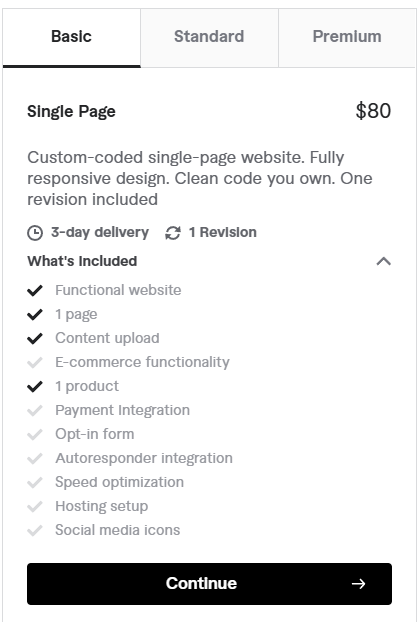
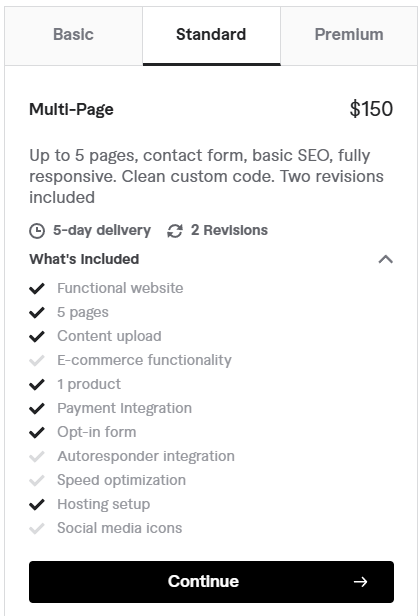
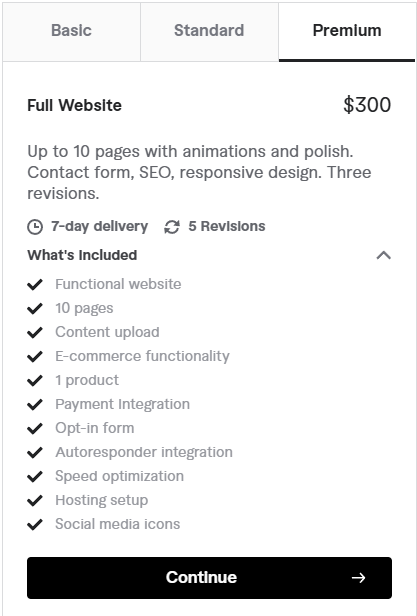
All of these are the base prices with optional upgrades depending on what you are looking for.
This is just the cost to build the website. With any designer there will be monthly or yearly costs to make the website live. Sometimes they roll that into their plans, sometimes it is unsaid.
How to Actually Decide
Is your website a brochure or a product?
If it just describes your business, a template works.
If it is your business, build it right
Here are the questions I would personally ask if you came to me trying to figure out what you want to build:
Question 1: What does your site need to do?
Answer: Display information and look professional ➡️ Page builder is fine
Answer: Have user accounts, manage payments, have custom logic ➡️ You're probably in custom territory
Question 2: What is your timeline?
Answer: I need something live this week ➡️ Page builder
Answer: I'm building something I want to last for years ➡️ I would lean towards custom
Question 3: What is your real budget, including the next 3 to 5 years?
This one isn't as clearcut.
A $200 page builder setup that costs $50/month for five years is $3,200 total. A $4,000 custom build with a $20/month hosting fee is $5,200 total. The gap is smaller than it looks and you own one of them.
Ultimately this question is a question that you can only answer yourself. I can tell you that a custom-built site with owning the code (you can take it all down and put it back up years later) has its advantages, but I am not the one controlling the coin purse.
Question 4: How unique does this need to be?
Answer: Clean and professional is enough ➡️ Templates work for you
Answer: I have a specific vision that templates probably can't match ➡️ Custom
Question 5: Is this core to your business or just a support function?
Answer: My website IS my product ➡️ Yep, sit down, custom is for you
Answer: I just need a place to send people for basic information ➡️ Page builder is great
81% of small businesses have redesigned their website at least once
90% plan website investment in the next 12 months
In business, too many people obsess over tools, software tricks, scaling issues, fancy office space, lavish furniture, and other frivolities instead of what really matters. And what really matters is how to actually get customers and make money.
The Bottom Line
There's no wrong answer here, just an answer of what you want from your site. If the answer is right for your situation, your budget, your timeline, and your goals then you can't go wrong.
Page builders are great tools. They have opened the way to the internet that was previously gatekept with esoteric knowledge by a small group of coding wizards. I recommend these tools to people all the time. If you need something simple, fast, and cheap--don't let anyone convince you that you need to spend an astronomical amount on custom development. That's the gatekeeping nonsense I mentioned earlier.
But if you are building a product with real complexity, something that you own, and something you are betting your business on then cutting corners on the foundation is a mistake which you will pay for later.
Only 12% of small businesses use custom development. The other 88% are using page builders or DIY solutions—which is often the right call.
But if you're in that 12% (or should be), you need someone who knows what they're doing.
Here is the secret about building a business. 1. Have a product that users love. 2. Use the right tools for what your needs are. 3. Earn more than you spend. At the end of the day the question isn't "oh, did you get the flashiest thing?" It is "did you get the thing that you needed?"
Where I come in
Okay, okay, okay, shameless plug time. Here we are at the end of the article, let me tell you a little bit about what I do. I build custom websites, apps, and software. No templates. No page builders. Just clean code that you own and is built exactly for what you need.
That's not the right fit for everyone--and I'll tell you if it's not. The software industry is a competitive market especially for a freelancer, but spending thousands of dollars on something that you could spend a fraction of the cost on is something that I will be honest about.
I care deeply about people, and I want them to do what is best for their business. Feel free to reach out any time and I will give you a quote and the realities of your business.
Get in Touch
Have questions? Send me a message and I'll respond within 24-48 hours.

Thanks for reading.
-Tyler
Footnotes
How did you find this post?

Comments